Chatbots you draw on a canvas, not squeeze into a form
Lay the conversation out as a flow: triggers, questions, branches, waits, API calls and handoffs. Test it in a simulator, publish it, and see every run step by step.
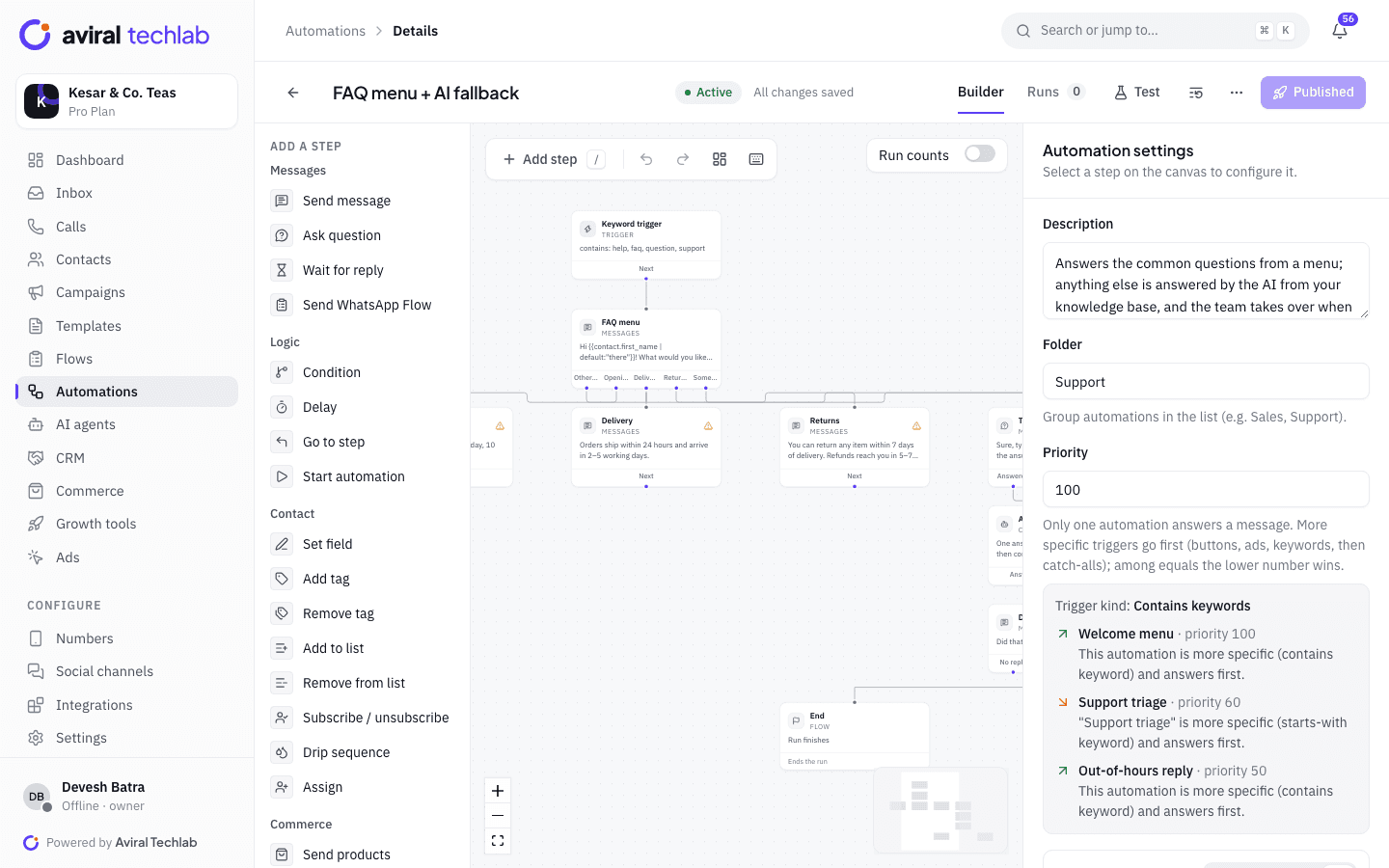
No limit on flow size
Your plan limits how many automations are live, not how many steps each one can have.
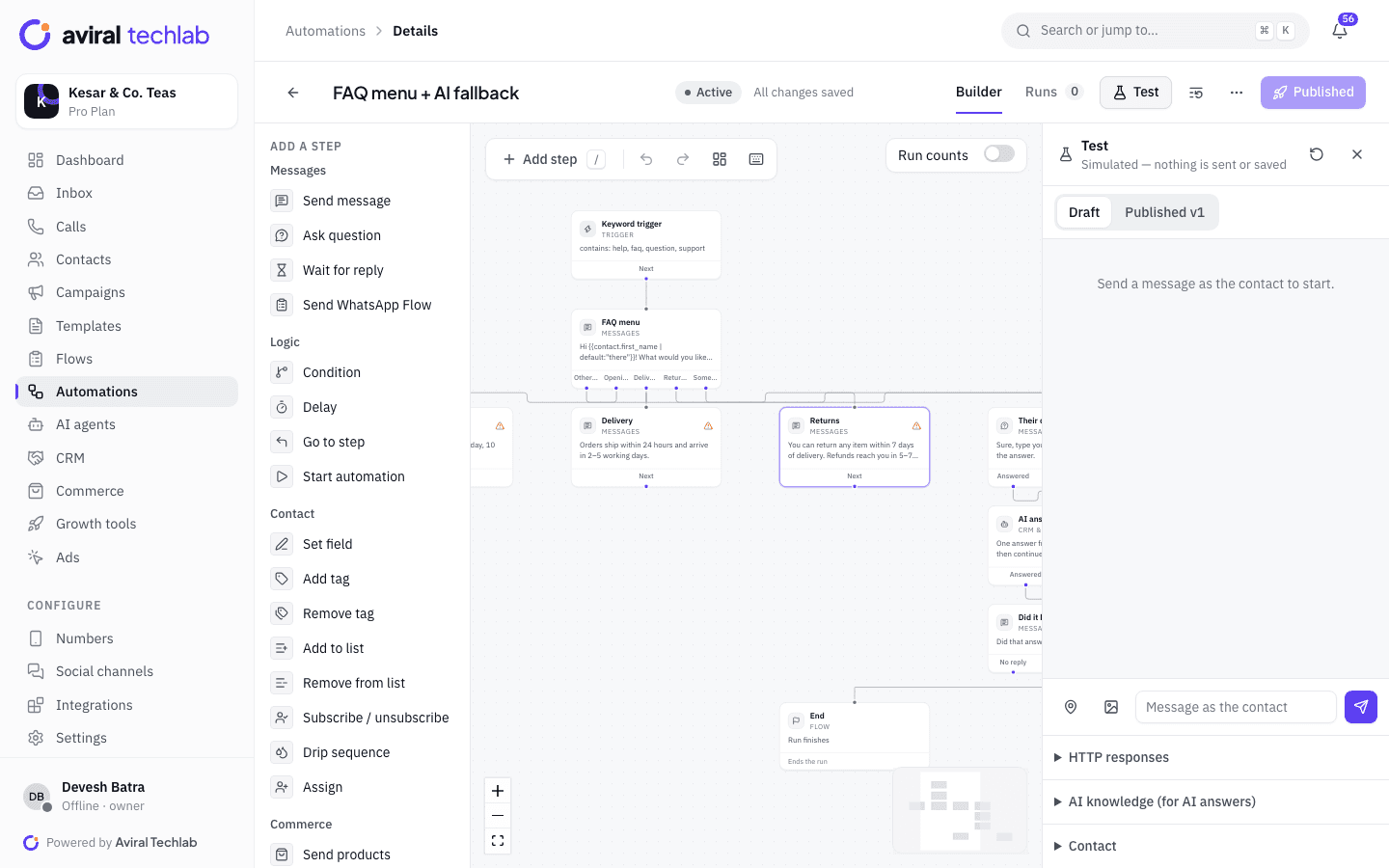
A simulator, not a guess
Chat with your flow as a fake contact. Nothing is sent and nothing is saved.
Versions you can roll back
Every publish is kept. Running chats finish on the version they started on.
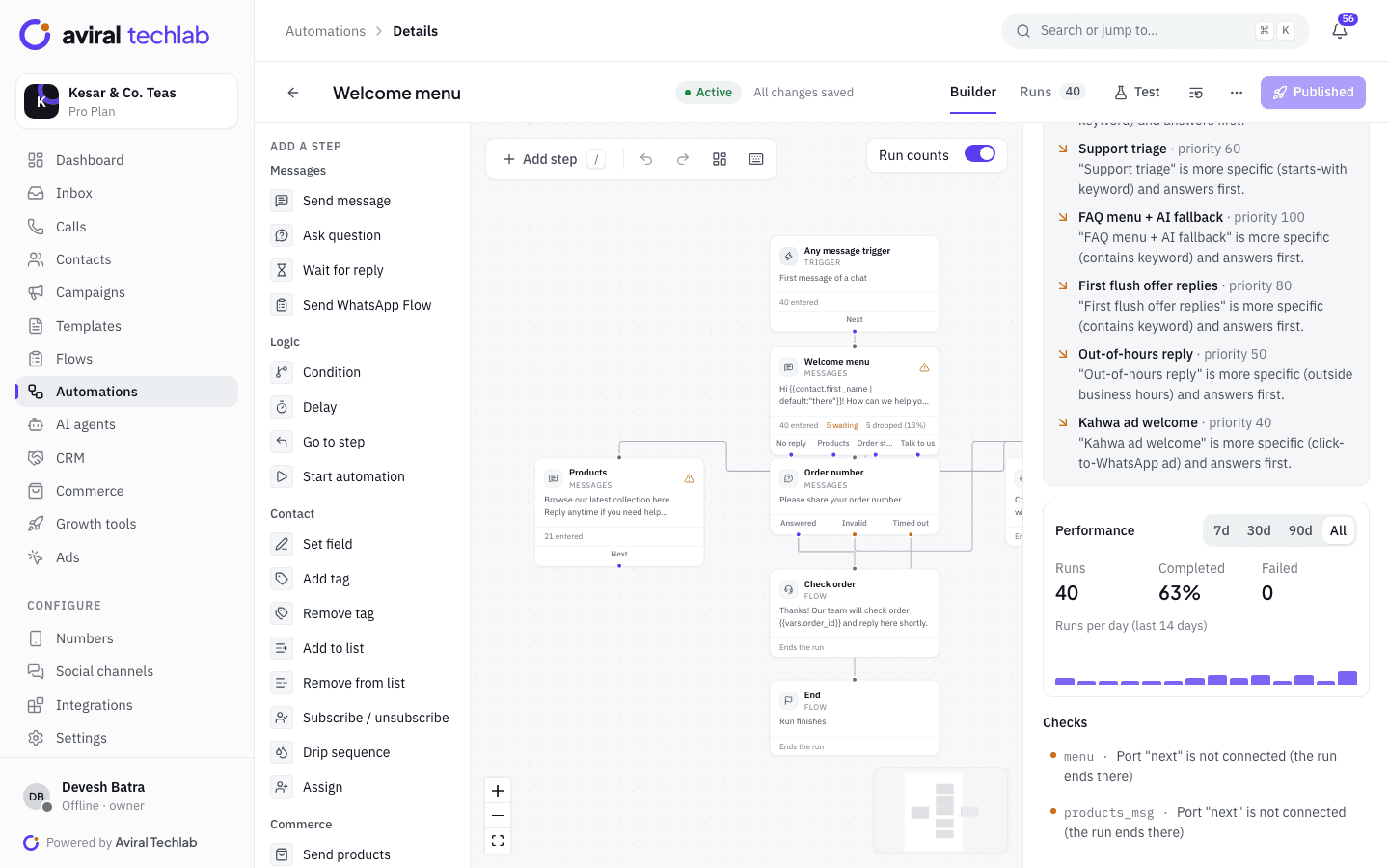
Run counts on the canvas
See how many people entered each step, are waiting there and dropped off.
Everything a bot needs to do real work
Start from a template, change what you need, and connect the flow to the rest of the product.
Templates
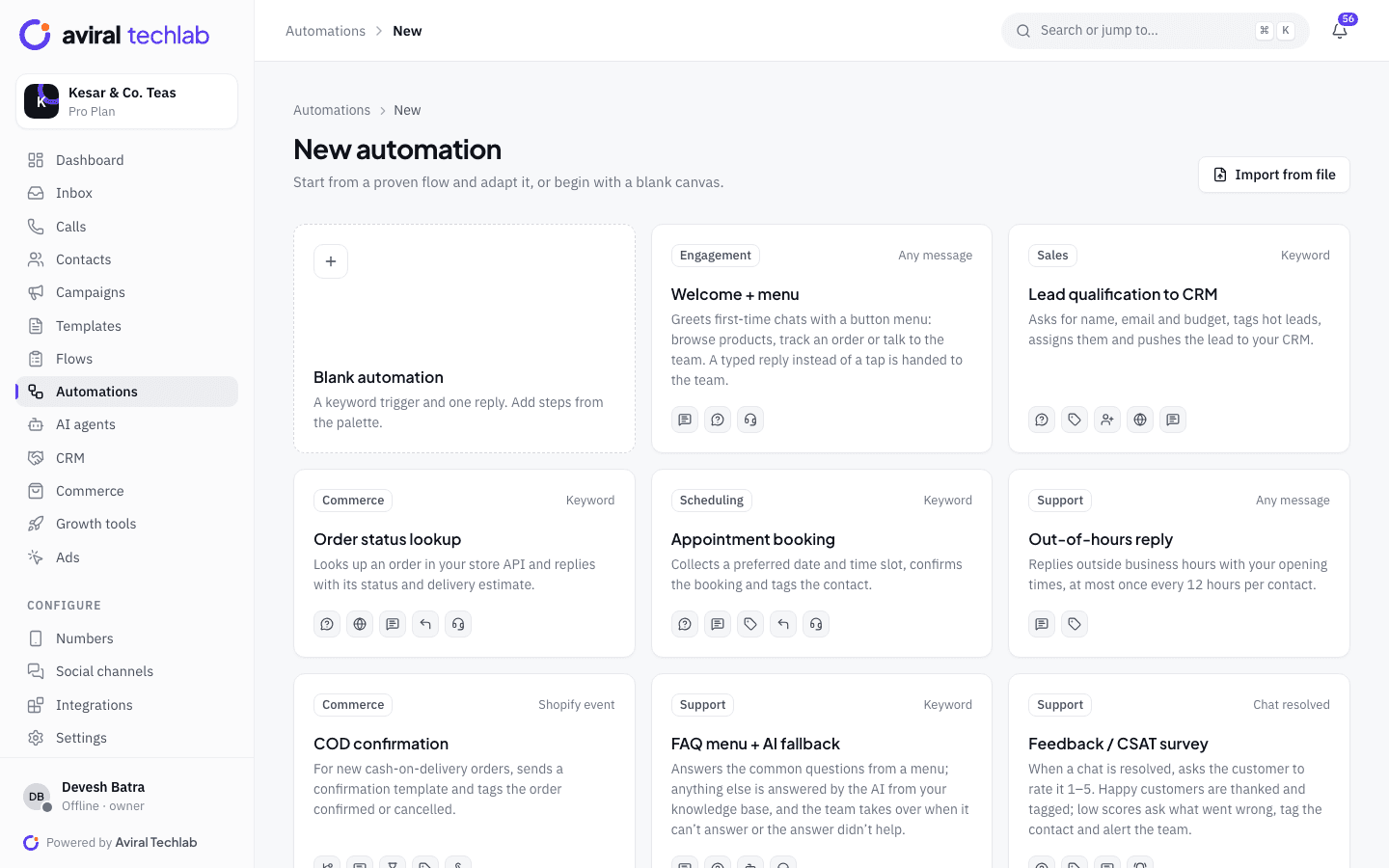
Start from one of 20 ready-made flows
Pick a flow that already works, then change the wording, branches and tags to fit your business. Or begin with a blank canvas, or import a flow from a file.
- Welcome menu, lead qualification to your CRM, order status lookup and appointment booking
- Cash-on-delivery confirmation, abandoned cart recovery and payment collection
- Click-to-WhatsApp ad welcome, webinar registration and opt-in collection
- Feedback and NPS surveys, return requests, a language picker and talk to an agent
Triggers and steps
Start from anything that happens, then do what a teammate would
A flow can begin with a keyword or a button tap, but also with a new contact, an ad click, a Shopify order, a payment, a tag, a form submission, a schedule or a webhook. From there, ask questions, branch on the answers and act.
- Keyword triggers with exact, starts-with, contains, regex and typo-tolerant matching
- Questions that validate text, numbers, emails, phone numbers, dates, choices, locations and media
- Call your own API with a response mapped to variables, or write a row to Google Sheets
- Tag, assign, add to a list, create a deal or a task, send products or a payment link, hand off to a person
Test and publish
Test it before a customer does
The simulator runs your draft or your published version against a fake contact. You type as the customer, the bot answers, and the path through the canvas lights up. Calls to your API are answered by a mock you control.
- Switch between the draft and the published version
- Checks flag steps that are not connected before you publish
- Publish creates a numbered version; restore any earlier one into the draft
- Compare a version with the draft to see what changed
Runs and results
See what every conversation did
Turn on run counts to see how many contacts reached each step, how many are waiting for an answer and how many dropped off. Open any run to read its path, the variables it collected and the result of each step, and cancel it if you need to.
- Completed, failed and waiting runs, with a daily chart
- Per-step entered, waiting and dropped counts on the canvas
- A run stops when a person replies, so the bot never talks over your team
The details that keep bots out of trouble
Rules that stop two bots answering at once, loops that never end and messages sent at the wrong time.
- One reply per message
- Only one automation answers an inbound message. Button taps go first, then ads and campaign replies, then keywords from most to least specific, then catch-alls. A priority number breaks ties.
- Business hours and re-entry rules
- Run a flow only outside working hours, only for a contact’s first message, once per contact, or once every set number of hours. An out-of-hours reply is one of the ready-made flows.
- Waits, delays and timeouts
- Wait for a reply, pause for up to 30 days, or wait until a time of day or until your business hours open. A question has an invalid-answer branch and a timeout branch so no chat gets stuck.
- Branch by value or split at random
- Send people down different paths by a field, a tag or an answer, or split them at random in the proportions you choose to test two versions of a flow.
- Flows that call flows
- Start another automation from a step, enrol a contact in a drip sequence, or send a WhatsApp Flow form and continue when it is submitted.
- Hand-off with context
- Hand the chat to a person, a team or an AI agent, and notify your team. Agents see which flow is running in the inbox.
- Safe by default
- Loops are stopped, calls to private network addresses are refused and HTTP calls time out and retry within limits. Opted-out contacts are never messaged.
- Other channels and the API
- Run the same logic on Instagram and Messenger chats, or start a flow from your own system with a webhook or an API call.
From idea to live bot
- 1
Pick a template or a blank canvas
Choose the trigger: a keyword, a button, an ad, an event or a schedule.
- 2
Add steps and test
Drag in questions, messages and actions, fix anything the checks flag, then try it in the simulator.
- 3
Publish and watch
Publish to create version 1. Watch run counts and the run list, and roll back if something looks wrong.
Frequently asked questions
Is there really no limit on how big a flow can be?
Your plan limits how many automations can be active at once (5 on Starter, 25 on Growth, 100 on Pro, unlimited on Enterprise), not how many steps each has. A single flow can hold up to 500 steps, which is a safety limit against runaway loops rather than a plan limit.
Can a chatbot send messages outside the 24-hour window?
Only with an approved template. A template step can send at any time. A plain message step needs an open window, and you choose whether it is skipped or counted as a failure when the window has closed.
What happens when a customer types something the bot did not expect?
A question step has an invalid-answer branch, and a menu can hand a typed reply to your team. You can also let an AI agent answer from your knowledge base and hand over when it is unsure.
Will the bot keep replying after my team joins the chat?
No. When an agent replies, the running flow steps back and the run is marked cancelled, so customers do not get two answers.
Can I connect the bot to my own system?
Yes. A step can call any HTTPS API with headers and a body and map the response into variables. Your system can also start a flow with a webhook or the REST API, and Zapier, Make and n8n can trigger runs too.
See it working with your own number
Book a 20-minute walkthrough. We’ll connect your WhatsApp Business account with you and set up your first automation.