A pipeline where every deal already has its chat
Leads arrive on WhatsApp, so the CRM sits next to the conversation. Move deals across stages, set follow-ups and see the whole history in one place, without syncing two tools.
A board your team can use
Drag deals between stages, see the value and count per stage, and filter by owner, source or tag. It also works from the keyboard.
Contacts that stay clean
Lists, segments, tags and custom fields, with duplicate detection and a merge that keeps the history.
Follow-ups that do not slip
Tasks have due dates and reminders that pop up on whatever page you are on, with Done and Snooze.
Wired into automation
Chatbots and AI agents can create deals and tasks, and a deal changing stage can start an automation.
Everything a small sales team needs, nothing it has to maintain
The CRM shares its data with the inbox, campaigns and commerce, so a deal knows about the chat, the campaign and the order behind it.
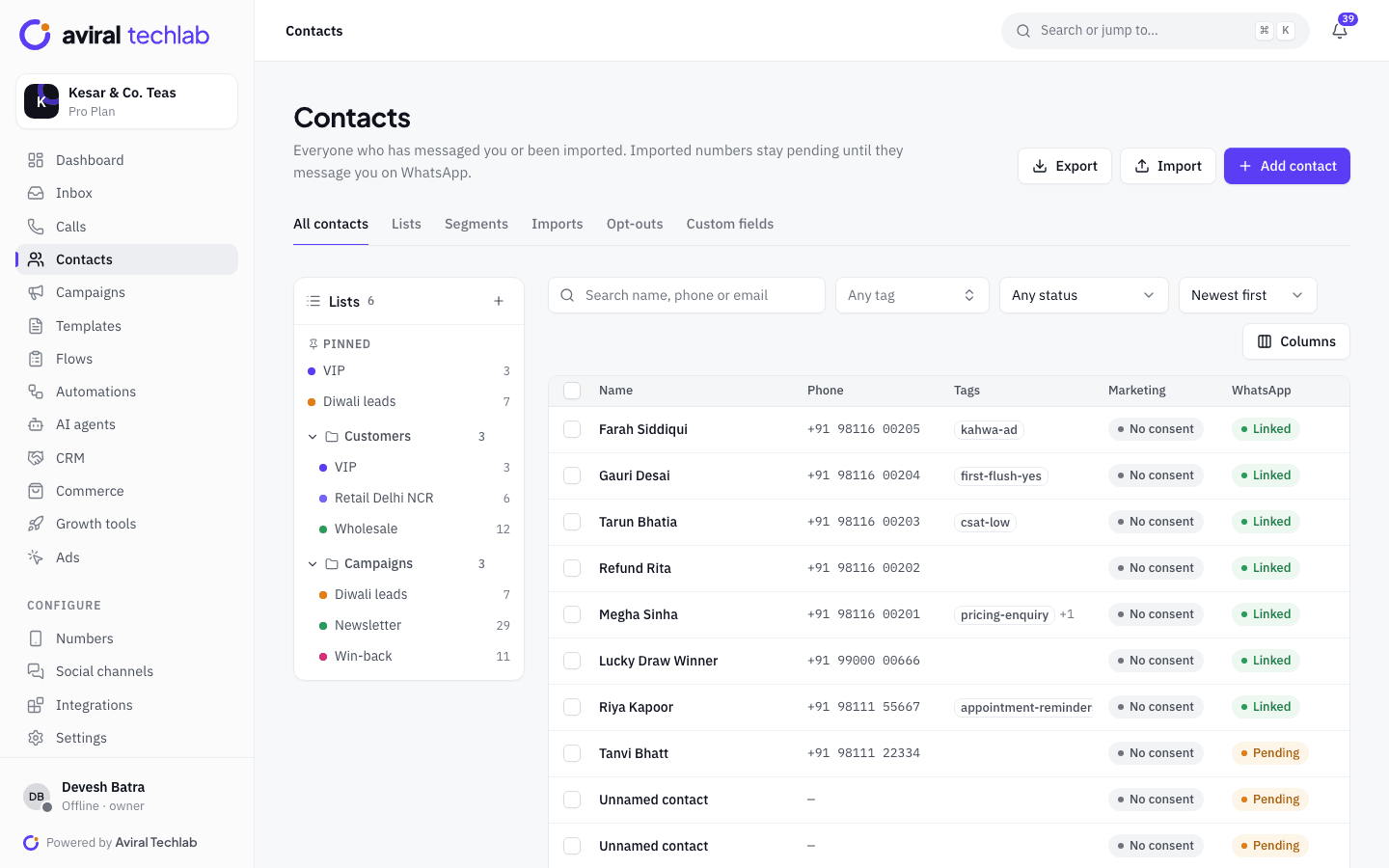
Contacts
Organise contacts the way you sell
Group people into lists and folders, build segments from rules on fields, tags and activity, and add the custom fields your business needs. Import from a spreadsheet and the platform finds duplicates for you.
- CSV and Excel import with column mapping, or pull from Google Sheets
- Dynamic segments for campaigns, drips and automations
- Marketing consent and opt-out status on every contact, with your own opt-out keywords
- Bulk actions: add tags, add to a list, send a template or export
Deals and timeline
One timeline for the contact, the deal and the company
Open a deal and read what happened: the chat, the campaign they read, the order they paid, the note a colleague left and every stage change. Log calls, meetings and emails from the same place.
- Stages with a win probability, so the board shows weighted pipeline value
- A reason is asked when a deal is lost: price, competitor, no response, timing, budget or your own note
- Custom deal fields: text, number, currency, date, yes or no, list and link
- Companies with GSTIN, linked to their contacts and deals
Tasks and automation
Never lose a lead to a forgotten follow-up
Turn the next step into a task for yourself or a teammate: a call, a meeting, a WhatsApp message or an email. A reminder appears when it is due. Automations can create the deal and the task for you the moment a lead qualifies.
- Deal stage changed, deal won and deal lost are automation triggers
- Automation steps create a deal, move a deal and create a task
- The AI agent can create a deal or a task when someone shows buying intent
Where the leads come from, and where they go
The CRM is only as useful as what flows into it. These sources and syncs are built in.
- Chats and ads
- Every new WhatsApp chat becomes a contact. Chats that start from a click-to-WhatsApp ad keep the ad they came from, so you can tell which campaigns bring buyers.
- IndiaMART enquiries
- Each buyer enquiry becomes a contact and a deal, with an instant WhatsApp welcome so you reach them before a competitor does.
- Zoho CRM and HubSpot
- Keep leads, contacts and deals in step with the CRM you already use, in either direction for Zoho CRM. Connectors start on the Growth plan.
- Forms and chatbots
- Answers from WhatsApp Flows and chatbot questions are saved to the contact, and can tag them or start a deal.
- Your website
- The chat button and WordPress plugin tag where a visitor came from, so a lead from your site is a lead you can follow.
- Orders and payments
- A contact’s orders, payments and lifetime value show beside their deals, so you sell to people with their history in view.
- Roles and visibility
- Roles control who can see every chat, who can manage deals and tasks, and who can view analytics or export contacts.
- API access
- Read and write pipelines, deals and tasks through the REST API to connect an ERP, a website or your own tools.
Set up your pipeline in an afternoon
- 1
Bring in your contacts
Import a spreadsheet, sync from your CRM, or let new chats create contacts as they arrive.
- 2
Name your stages
Start from the default sales pipeline or rename the stages, set win probabilities and add your deal fields.
- 3
Let deals arrive
Create them from a chat, from a chatbot or AI step, from IndiaMART or through the API, and assign owners.
Frequently asked questions
Do I need a separate CRM?
For most small sales teams, no. The built-in CRM covers contacts, companies, deals, tasks and a timeline, and it already has the WhatsApp history. If your team lives in Zoho CRM or HubSpot, connect it and keep both in step instead.
How do deals get created?
An agent can create one from a chat in a click. A chatbot step or an AI agent can create one when someone shows buying intent, a connector can create one from an IndiaMART enquiry, and the REST API can create them from your own systems.
Is the CRM included in every plan?
Yes. Every plan includes contacts, deals and tasks. Higher plans allow more pipelines, so you can run separate ones for sales, wholesale or partnerships.
Can I see which ad or campaign a lead came from?
Yes. Contacts from click-to-WhatsApp ads keep the ad they came from, and the timeline shows the campaigns they received and read.
Can I stop my team seeing everything?
Yes. Roles control who can see every chat or only the ones assigned to them and their team, who can work with deals and tasks, and who can view analytics or export contacts. You choose what each role gets.
See it working with your own number
Book a 20-minute walkthrough. We’ll connect your WhatsApp Business account with you and set up your first automation.