Forms and bookings that open inside the chat
Customers fill a form, pick a time slot or upload a photo without leaving WhatsApp. You build it on a canvas, send it from anywhere and get the answers on the contact.
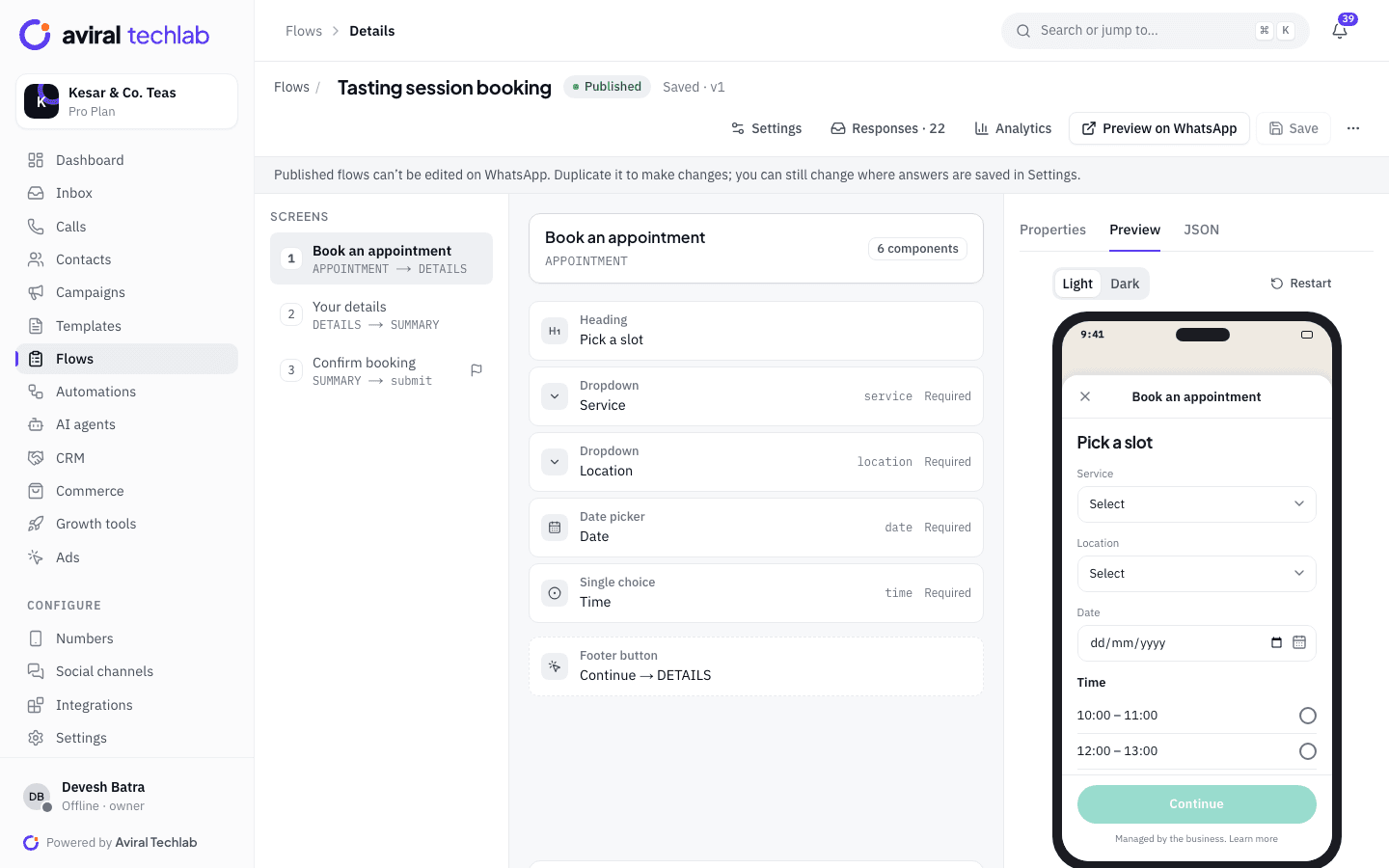
A visual builder
Add screens and components, set rules and watch the phone preview update. Or edit the raw Flow JSON if you prefer.
Answers on the contact
Save each field to a contact field, a tag, a list or a marketing opt-in, with no export step.
Real availability
Offer time slots with capacity. A slot is held while someone fills the form and freed if the booking is cancelled.
Completion analytics
See how many forms were sent, read and completed, how long they took and where people dropped off.
From a blank screen to answers in your CRM
Meta’s WhatsApp Flows are powerful but hard to hand-write. The builder checks your flow as you go and handles the parts that need a server.
Builder
Design each screen, then see it as the customer will
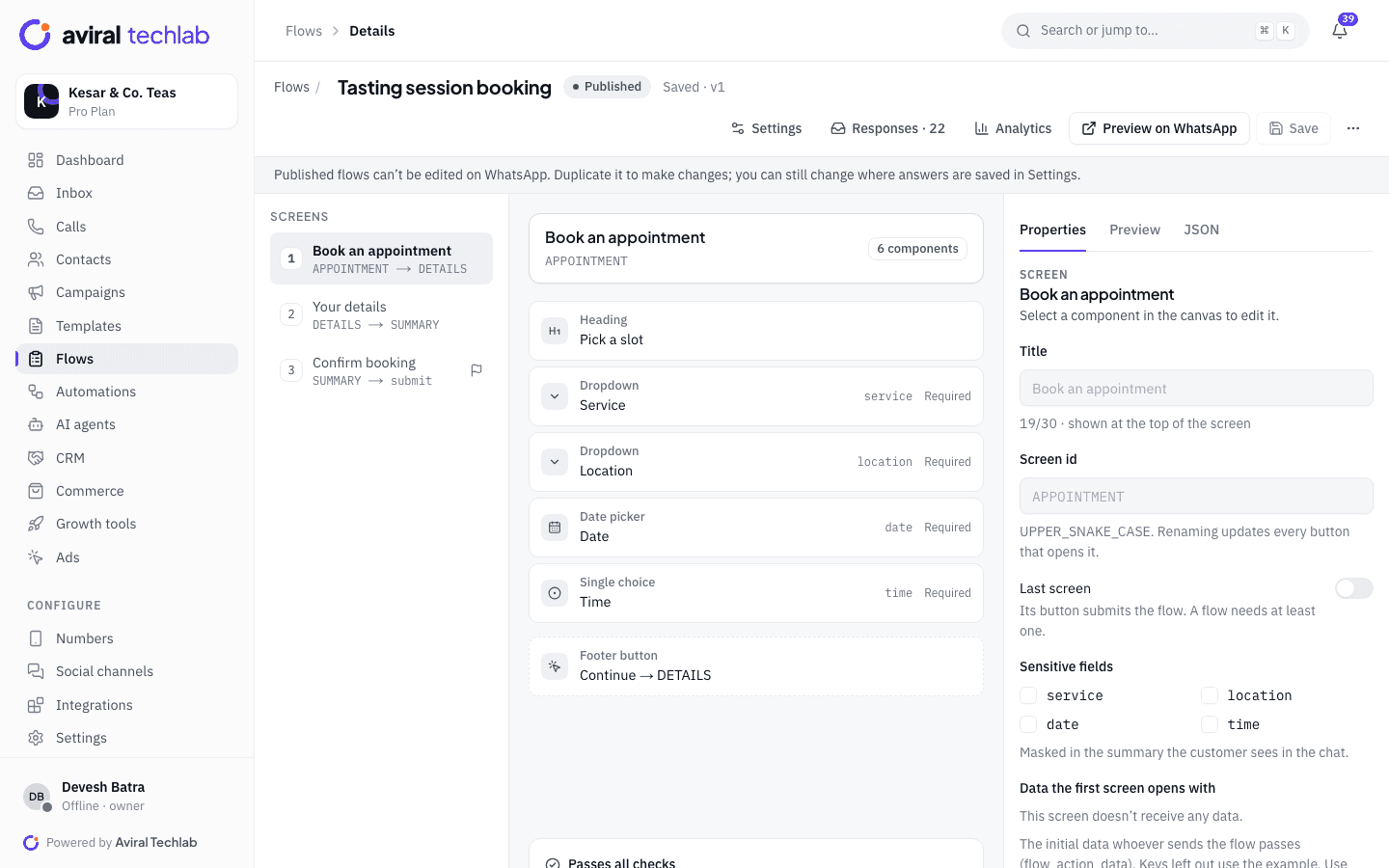
Start from a template or a blank flow. Add text, inputs, dropdowns, date and calendar pickers, choices, photo and document uploads, and set which screen each button opens. A checker flags anything WhatsApp would reject before you publish.
- More than 20 components, including If and Switch for branching on an answer
- Light and dark phone preview, and a Preview on WhatsApp button for a real device
- Mark fields as sensitive so the summary the customer sees in the chat masks them
- Import and export Flow JSON, with a JSON editor next to the visual one
Sending
Send it from anywhere in the product
A published flow is one tap away from the chat. Send it to one customer from the inbox, to thousands in a broadcast, from a chatbot step that waits for the submission, or from an AI agent. Your own systems can send it through the API.
- A button on a template, with a guided way to create and submit that template
- A send-form step in the chatbot builder, and a “form submitted” trigger
- Test send to your own number before anyone else sees it
Responses
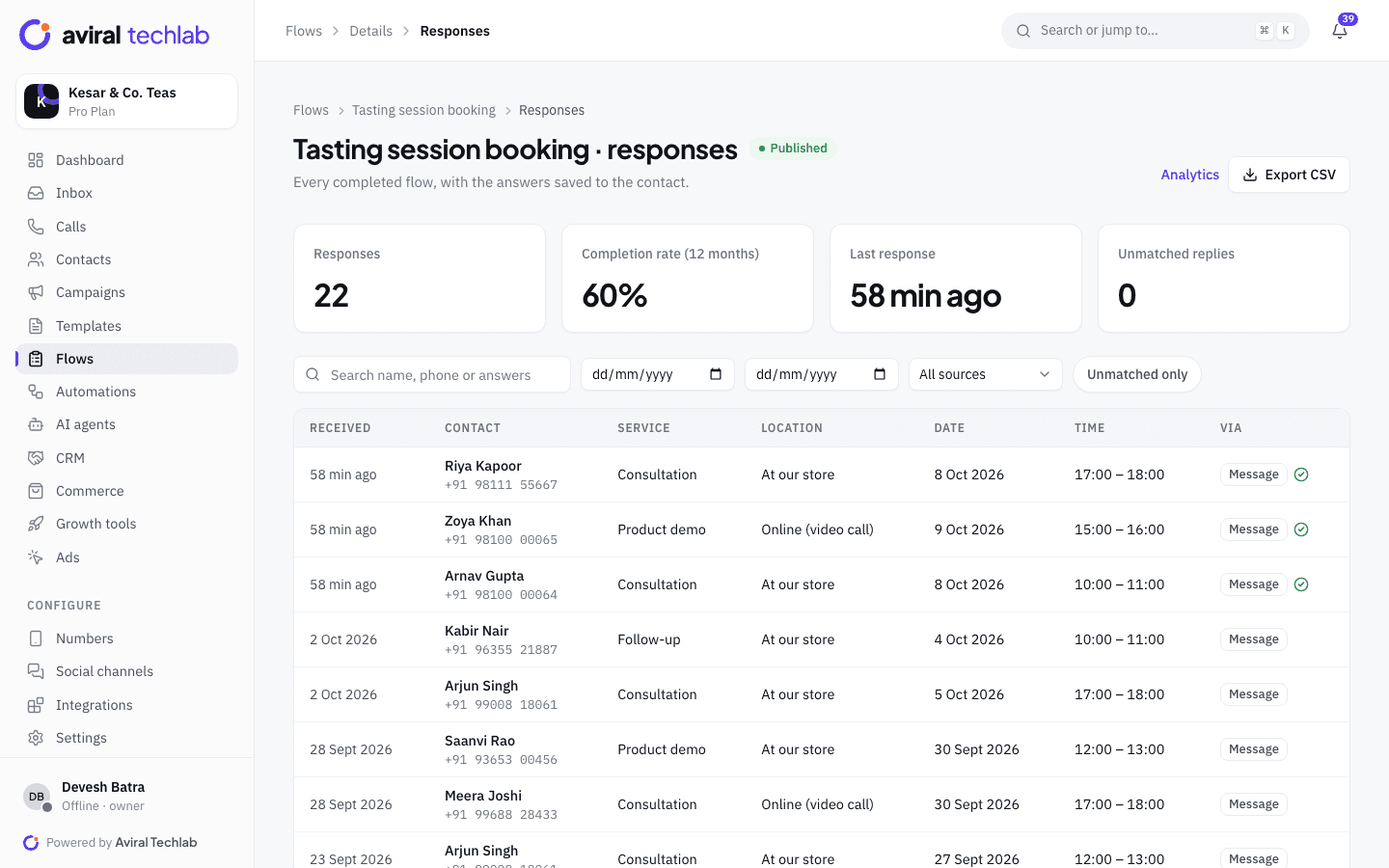
Read every answer, labelled and searchable
Every completed flow appears with its answers in plain words, the contact who sent it and where it came from. Filter by date, source and status, open any response and export the lot as a CSV. A reply that does not match a flow you sent is marked Unmatched instead of being lost.
- A Bookings tab for slot flows, with a Cancel button that frees the slot
- An optional thank-you message that repeats the answers, and a team that is notified and assigned
- The same answers show on the contact’s timeline in the CRM
Analytics
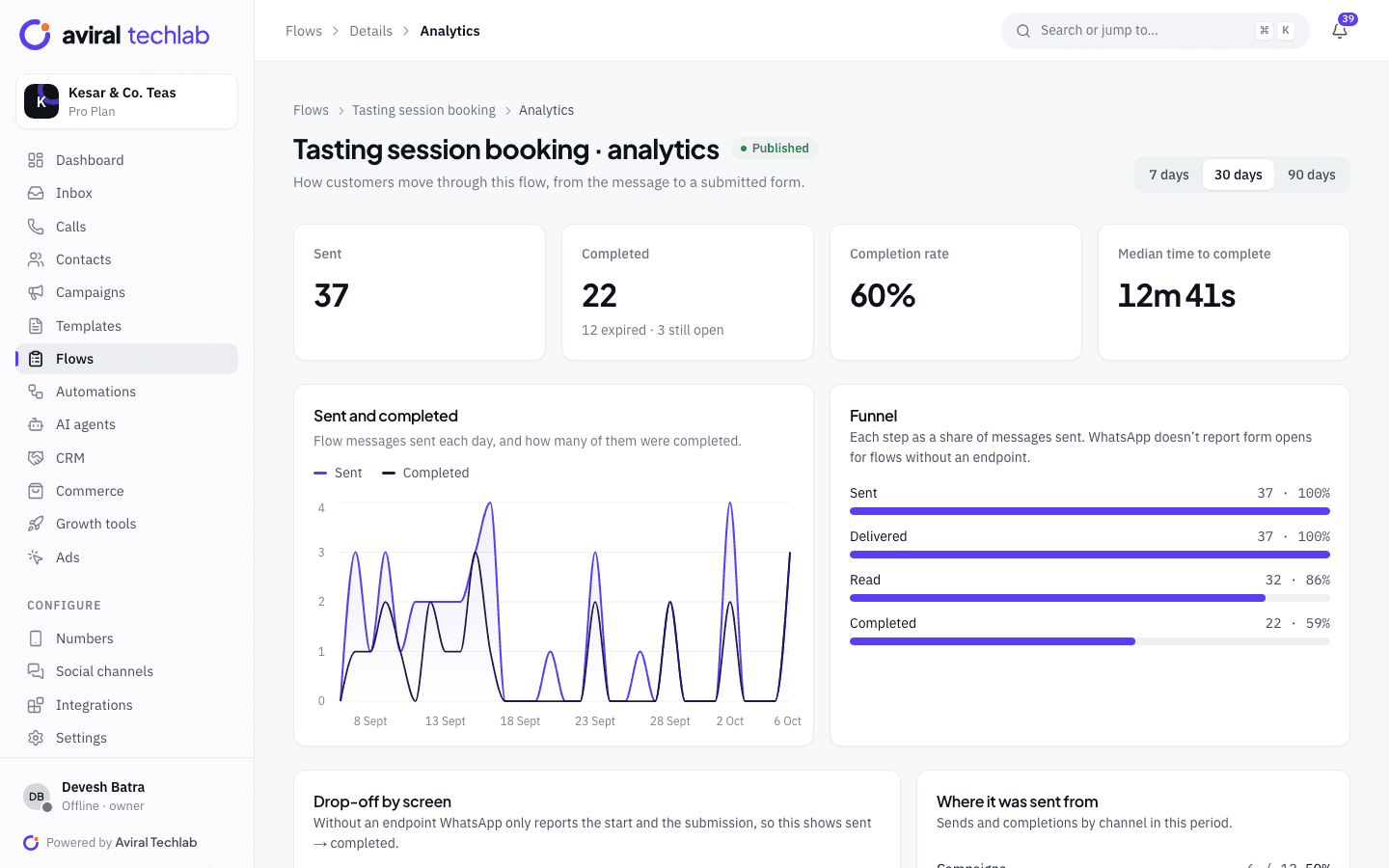
Find where people give up
The funnel shows how many forms were sent, delivered, read and completed. Median time to complete tells you whether the form is too long, and the drop-off view shows which screen loses people.
- Sent and completed per day, over 7, 30 or 90 days
- Completions by source: broadcast, chatbot, inbox or API
- Drop-off by screen for flows that use an endpoint
What you can build, and how it behaves
Most forms need no server at all. When you want live data, the platform hosts the encrypted endpoint for you.
- Thirteen ready-made flows
- Lead form, appointment booking, appointment with live slots, survey, feedback, NPS, sign-up, KYC, order address, event registration, callback request, table reservation and job application.
- Where each answer goes
- Map a field to the contact’s name or email, to a custom field you create on the spot, to a tag, to a list, or to WhatsApp marketing consent. Mappings can be changed on a published flow.
- Slots with capacity
- Set opening hours, slot length, how many people a slot takes and the days you are closed. Two customers cannot take the last place at the same moment.
- Branch without a server
- Send people to different screens based on their answers, entirely inside the flow. Connect an endpoint only when you need data that changes.
- Live data from your own sources
- Fill options from a contact field, an earlier answer, a product set or an HTTPS address. The platform handles Meta’s encryption and key rotation.
- After the submission
- Trigger an automation when a form is submitted: tag the contact, create a deal, notify a teammate, send a payment link or enrol the person in a drip.
- A calendar for bookings
- Add a calendar picker or a date picker, limit the selectable dates and tie the choice to your slot rules.
- Categories and statuses
- Flows carry Meta’s categories (lead generation, appointment booking, support, survey and more) and a clear status: draft, published, deprecated, or blocked and throttled by Meta.
Publish your first flow
- 1
Start from a template
Pick the closest one, such as appointment booking, and change the screens, questions and wording.
- 2
Map the answers
Choose where each field is saved and what the customer sees after submitting.
- 3
Preview, publish and send
Check it in the phone preview, send a test to your number, publish, then send it from the inbox, a broadcast or a bot.
Frequently asked questions
What is a WhatsApp Flow?
It is a native form that opens inside the WhatsApp chat. The customer taps a button, fills in a few screens and submits, and WhatsApp sends the answers back. It is faster than typing replies one by one and works the same on Android and iPhone.
Do I need my own server?
No. Most forms save their answers without any server, and the platform can branch between screens by answer. For live data such as available slots, the platform hosts the encrypted endpoint for you.
Does a Flow cost extra?
Meta does not add a separate charge for the form. The message that carries it is billed like any other message of that kind, so check the message category you use.
Can I edit a flow after publishing it?
Meta locks a published flow. To change the screens, duplicate it, edit the copy and publish that. You can still change where answers are saved and the thank-you message on the live flow.
Where do the answers go?
To the contact, as fields, tags, list memberships or opt-in, and to the Responses page where you can filter and export them. Slot flows also create bookings you can cancel.
See it working with your own number
Book a 20-minute walkthrough. We’ll connect your WhatsApp Business account with you and set up your first automation.