Broadcasts people actually reply to
Pick an approved template, choose who gets it and see the Meta charge before you press send. Then watch delivery, reads, replies, link taps and payments arrive live.
Exact audiences
Include and leave out lists, segments, tags and CSV imports. A person in several sources still gets one message.
Cost before you send
The review step shows who will be skipped and why, and estimates the Meta charge for your template and country.
A/B tests with a winner
Test up to five versions on a sample, then send the best one to everyone else automatically.
Repeats and follow-ups
Recurring campaigns and drip sequences keep reaching people without someone re-creating the broadcast.
From the first template to the last reply
A broadcast is more than a send button. The platform checks the audience, protects your number and shows what each message earned.
Audiences and consent
Send to the right people, and skip the wrong ones
Build the audience from lists, saved segments, tags, an imported CSV or everyone, then leave out any group you do not want to reach. Before anything goes out, the review step shows how many people will be skipped and the reason.
- People who replied STOP or were opted out by your team are never messaged
- A frequency cap (1 to 10 marketing campaigns per person in 24 hours) and quiet hours that pause sending overnight
- Marketing templates only go to contacts with a recorded opt-in
- Send a test to up to five numbers first, with variables filled in
Templates
Templates that show products, not just text
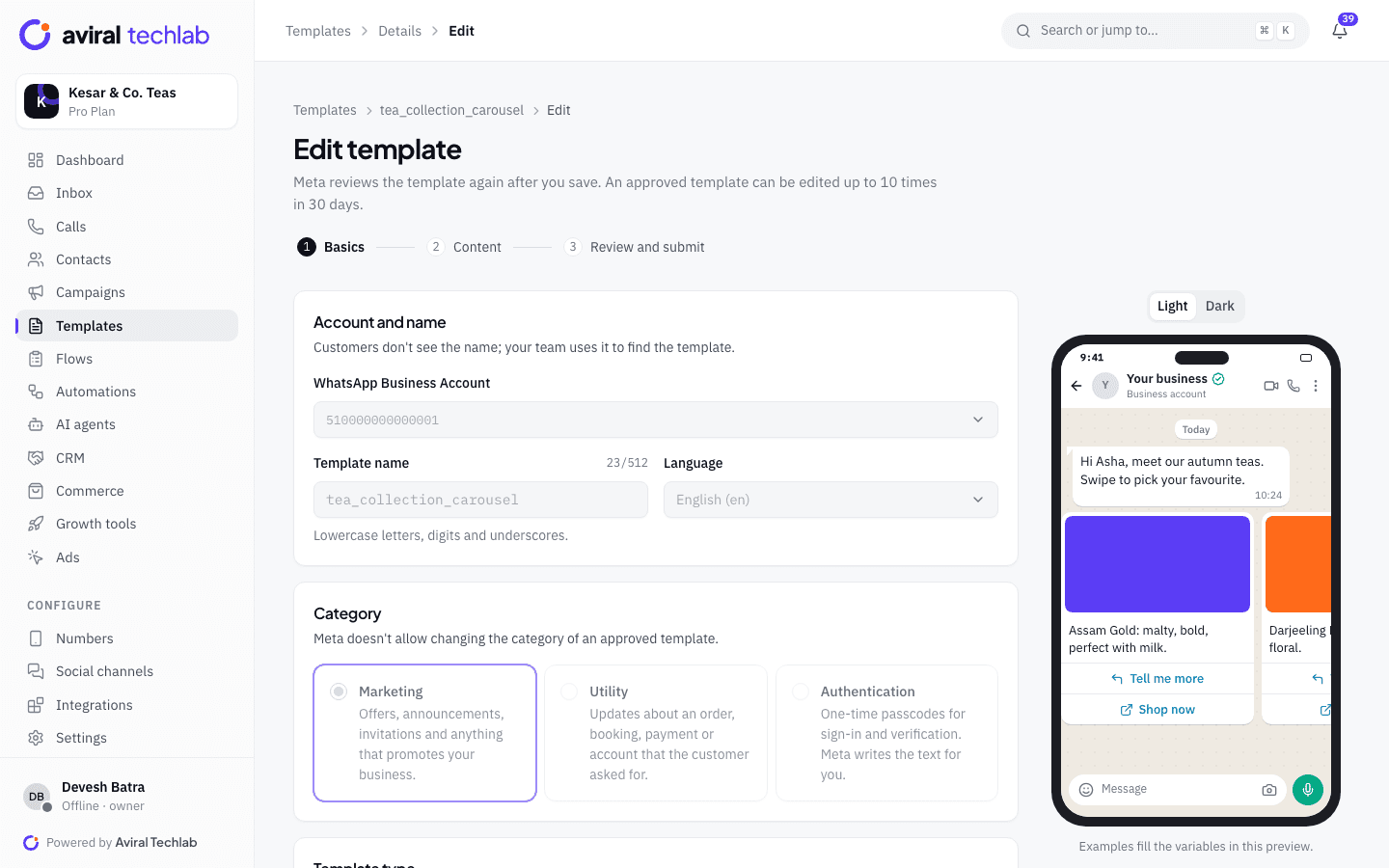
Build and submit templates to Meta from one screen, with a live phone preview. Besides plain text, broadcasts can carry the richer formats that get replies.
- Carousels of 2 to 10 cards, each with its own image and buttons
- Limited-time offers with a countdown, and copy-code coupons
- Image, video and PDF headers, catalog buttons and WhatsApp Flow buttons
- Template statuses, quality and rejection reasons explained in plain words
A/B tests and retargeting
Test the message, then follow up with the people who read it
Compare up to five versions of a template on a sample of your audience. After the test window, the version with the best read, reply or click rate goes to everyone else. When a broadcast ends, turn any result into a list and send the next message to it.
- Choose the winning metric and the test window (1 hour to 2 days)
- Save the people who read but did not reply, or got a payment link but did not pay, as a list
- Replies to a campaign can start a chatbot or hand over to an agent
Scheduling
Schedule, pace and repeat
Send now or pick a date, time and time zone. Spread a large send over hours so replies arrive in waves your team can handle, and set up the broadcasts you send every week once.
- Suggests a send time from the read rates of your own past broadcasts
- Paced to your number’s limits, or capped from 60 to 200,000 messages an hour
- Recurring campaigns and a calendar of everything scheduled
- Drip sequences of up to 20 steps: templates, product messages and payment links
What else is in a campaign
The details that decide whether a broadcast is safe to send and easy to learn from.
- Live progress and control
- Watch sent, delivered, read and failed counts move as the campaign runs. Pause, resume or cancel at any time.
- Number quality guard
- A campaign pauses by itself if Meta pauses the template or your number’s quality rating turns red. You choose whether to resume.
- Tracked links
- URL buttons can use short links, so the report separates people who tapped a button from people who opened the page.
- Payment links in a broadcast
- Attach a payment link to each message and see how many were sent, paid, pending or expired, and the amount collected.
- Failures that explain themselves
- Failed messages are grouped by reason and Meta error code. Export every recipient and its status as a CSV.
- Any of your numbers
- Send from the number that fits the audience. Each campaign is tied to one number and its quality rating.
- Drips that stop when they should
- Enrol people from a list, a segment, an event such as a new contact, or by API. A sequence ends for anyone who opts out, and can end when they reply.
- Cost by country
- The estimate prices each recipient by country and template category, so a mixed audience is not guessed at one rate.
Send your first broadcast
The campaign wizard has the same steps every time.
- 1
Choose a template
Pick an approved template and map its variables to contact fields, with a fallback for missing values.
- 2
Choose who gets it
Add the lists, segments or tags to include and the ones to leave out, then review the skipped contacts and the estimated charge.
- 3
Send or schedule
Launch now, or set the time, time zone and speed. Optionally set up an A/B test first.
Frequently asked questions
Do I need an approved template to send a broadcast?
Yes. WhatsApp only lets you start a conversation with an approved template. You create it here, Meta reviews it, and it becomes available to campaigns once it is approved. Statuses stay in sync, and a rejected template shows the reason and what to change.
How much does a broadcast cost?
Meta charges per delivered template message, by category and country, Pay Meta directly and we add nothing on top, or use a prepaid wallet whose rates include a small processing margin. The review step estimates the charge before you send. Your plan also sets a monthly allowance of campaign messages: 25,000 on Starter, 250,000 on Growth and 1 million on Pro.
How do I avoid annoying people or getting my number flagged?
Set a frequency cap and quiet hours, keep opted-out contacts out automatically, and send marketing templates only to people with a recorded opt-in. Campaigns also pause if your number’s quality rating turns red.
Can I message people who have never contacted me?
Only with their permission. WhatsApp requires opt-in for marketing messages, so the platform records the source and time of each opt-in and skips contacts who do not have one.
How does the A/B test pick a winner?
You send versions to a share of the audience, choose read rate, reply rate or click rate as the metric, and set how long the test runs. When the window ends, the best version goes to the remaining contacts automatically.
See it working with your own number
Book a 20-minute walkthrough. We’ll connect your WhatsApp Business account with you and set up your first automation.